



What is a Holoscan Camera?
“Holoscan camera” isn’t a specific camera product category from NVIDIA. NVIDIA Holoscan is an AI sensor processing platform for real-time processing of streaming data at the edge or in the cloud. In practice, the term “Holoscan camera” is shorthand for a camera (or camera plus capture/bridge hardware) that can feed video into a Holoscan pipeline.
NVIDIA Holoscan platform at a glance:
- Holoscan SDK: the software framework for building real-time streaming pipelines (operators/graph) for sensor and video workloads.
- Holoscan Sensor Bridge: a sensor-over-Ethernet ingest layer for architectures that need high-speed, deterministic streaming into GPU processing.
-
Deployment: the production stage—packaging and running Holoscan applications on edge hardware in real environments (beyond prototyping).

Source: NVIDIA® Holoscan
Most deployments use one of two ingest patterns: local capture, where the camera (or capture device) shows up as a standard Linux video source, or networked ingest / sensor-over-Ethernet, where cameras or sensor modules stream over Ethernet and the system is designed for high-throughput, low-latency transport. Sensor Bridge is typically used in the second pattern, especially when the pipeline is built around distributed or networked sensors.
Benefits of Holoscan for Edge AI
Holoscan is a strong fit for Edge AI because it’s built to run real-time AI on streaming sensor data right where the data is generated. In practice, it helps teams turn continuous camera/sensor streams into on-device inference and decisions without relying on constant cloud connectivity.
- Faster AI decisions: run inference close to the sensor for lower end-to-end latency and tighter control loops.
- Lower bandwidth + cost: keep raw video at the edge and transmit only AI outputs (detections, events, metadata).
- More reliable AI in the field: maintain inference even with limited or intermittent connectivity.
- Scales to multi-sensor Edge AI: supports continuous, parallel streams (multi-camera / multi-sensor) feeding a unified pipeline.
- Flexible AI ingest paths: supports both local capture workflows and networked/sensor-over-Ethernet architectures, depending on system design.
Which platforms can support Holoscan?
NVIDIA positions the Holoscan SDK as compatible with multiple hardware platforms, specifically calling out x86_64 workstations and aarch64 (ARM) developer kits (eg. Jetson AGX/IGX). For production deployments, NVIDIA also documents a separate deployment stack approach (distinct from the development stack) intended for deploying Holoscan applications on NVIDIA developer kits in production environments.

Source: NVIDIA® Holoscan
Key Markets that Use NVIDIA Holoscan
Holoscan-style camera and sensor pipelines show up most often in industries that need real-time processing of streaming data at the edge.
Medical devices and clinical imaging
Used in workflows where live imaging streams need low-latency processing—commonly associated with surgical video and other clinical imaging pipelines.
Robotics and autonomous machines
A fit for edge robotics where cameras and sensors feed continuous streams into on-device compute for perception, navigation, and real-time decision-making.
Industrial automation and real-time inspection
Common in machine vision and inspection scenarios where throughput and deterministic processing matter (e.g., continuous monitoring and defect detection on production lines).
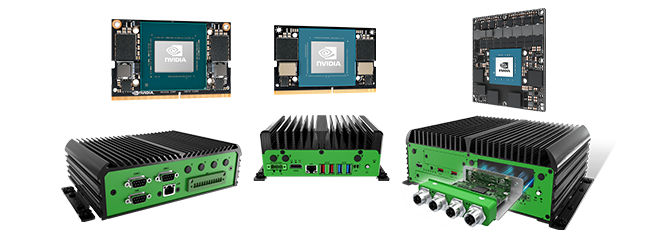
Premio JCO-6000-ORN Series (NVIDIA Jetson AGX Orin) for Holoscan Deployments
Holoscan is often evaluated in a “lab-to-field” progression—prototype on supported platforms, then deploy on edge hardware that can hold up in real operating conditions. Premio’s JCO-6000-ORN Series is positioned for that deployment stage: it’s an edge AI computer family built on NVIDIA Jetson AGX Orin (32GB/64GB) and designed as a rugged system intended for industrial/field environments where durability, thermal design, and reliable I/O matter as much as GPU performance.
For Holoscan camera pipelines, deployment readiness comes down to whether the system can sustain your continuous streaming workload (ingest → processing → output) without becoming fragile in the environment it’s installed in. That includes choosing the right ingest architecture (local capture vs network streaming) and ensuring the platform’s connectivity matches the design.

On the networking side, the JCO-6000-ORN Series includes one on-board 10GbE Ethernet port and supports an EDGEBoost I/O module that adds dual RJ45 10GbE Ethernet. In practical terms, a configured system can support up to 3× 10GbE connections (1 onboard + 2 via EDGEBoost) for Ethernet-heavy camera or sensor transport designs where network I/O can become the constraint.
FAQs
What is a Holoscan camera?
A “Holoscan camera” isn’t a special camera type—it’s shorthand for a camera (or camera + capture/bridge hardware) that can feed video into an NVIDIA Holoscan pipeline for real-time processing.
Is NVIDIA Holoscan a camera or a hardware product?
No. Holoscan is a platform that includes software (Holoscan SDK) and related components for building real-time streaming sensor applications; the camera is an input source to that pipeline.
What’s the difference between Holoscan SDK and Holoscan Sensor Bridge?
Holoscan SDK is the software framework for building the processing pipeline (operators/graph). Holoscan Sensor Bridge is used for sensor-over-Ethernet ingest when your architecture needs high-speed, deterministic streaming into GPU processing.
Can I use USB cameras with Holoscan?
Often, yes—if the camera or capture device can be exposed as a standard Linux video source (a common local-capture integration approach).
When do I need Sensor Bridge instead of local capture?
Sensor Bridge is typically considered when your design is based on Ethernet sensor streaming (for example, distributed/networked sensors) and you need high-throughput transport with predictable timing into the processing pipeline.
Does Holoscan run only on Jetson?
No. Holoscan is used across multiple platform types (including x86_64 systems and ARM-based developer-kit style platforms), and the right target depends on performance, I/O, and deployment requirements.
What should I check before choosing a “Holoscan camera”?
Start with the ingest architecture (local capture vs sensor-over-Ethernet), then confirm you can sustain your required resolution/FPS/format end-to-end, including transport, buffering, and GPU processing under load.